
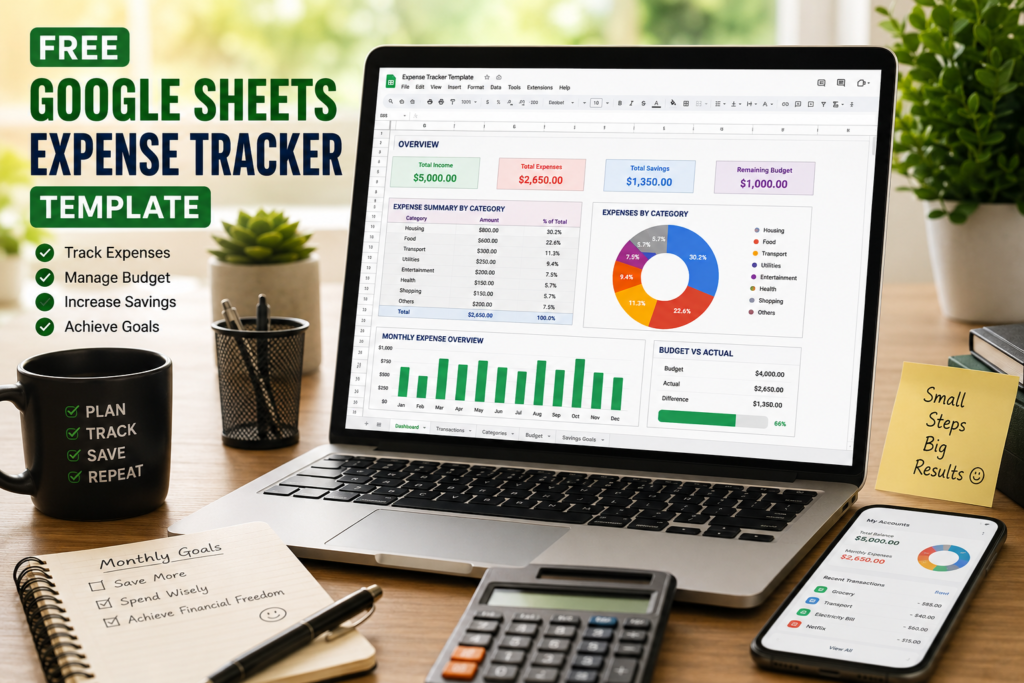

Free Google Sheets Expense Tracker Template: A Smarter Way to Manage Money in 2026
Most people don’t realize how quickly small daily expenses add up until they actually start tracking them.
One food delivery order here, an online subscription there, a few coffee runs during the week — and suddenly a big part of your monthly salary disappears without you even noticing where the money went.
That’s exactly why expense tracking has become so important in 2026.
More people are now looking for simple ways to manage their finances without using complicated accounting software or expensive budgeting apps. And honestly, this is where a Google Sheets Expense Tracker Template becomes incredibly useful.
It’s simple, flexible, free to use, and works from almost any device.
Whether you are a student trying to control monthly spending, an office worker managing salary expenses, a freelancer handling irregular income, or someone simply trying to save more money, a good expense tracker can completely change the way you handle your finances.
What Is a Google Sheets Expense Tracker Template?
A Google Sheets Expense Tracker Template is basically a ready-made spreadsheet designed to help you record and organize your income and expenses in one place.
Instead of building formulas, charts, and categories from scratch, the template already includes everything you need, such as:
- Expense categories
- Budget sections
- Automatic calculations
- Monthly summaries
- Visual charts and dashboards
- Savings tracking
The best part is that you don’t need advanced Excel knowledge to use it.
You simply enter your daily expenses, and the spreadsheet automatically updates totals, spending reports, and charts for you.
Since it works on Google Sheets, you can access it from:
- Laptop
- Desktop
- Tablet
- Smartphone
This means you can update your expenses anytime and anywhere.
Why Expense Tracking Matters More Than Ever
Managing money today feels very different compared to a few years ago.
People now deal with:
- Online subscriptions
- Food delivery apps
- UPI payments
- Impulse online shopping
- Streaming platforms
- Rising transportation costs
Because digital payments have become so convenient, many people spend money without fully realizing how much they are actually spending.
That’s why tracking expenses can be eye-opening.
Many users are genuinely surprised after their first month of expense tracking because they finally see where most of their money is going.
For some people, it’s food delivery. For others, it’s shopping, subscriptions, or unnecessary weekend spending.
Once you become aware of spending patterns, saving money becomes much easier.
Key Features of a Good Expense Tracker Template
1. Simple Daily Expense Entry
An expense tracker should never feel complicated.
A good template allows users to quickly enter:
- Date
- Expense category
- Description
- Payment method
- Amount
The easier the process feels, the more consistently people use it.
2. Automatic Calculations
This is one of the biggest advantages of using a spreadsheet template.
The tracker automatically calculates:
- Daily expenses
- Weekly spending
- Monthly totals
- Remaining budget
- Savings amount
You don’t have to manually calculate everything yourself.
3. Budget Planning
Budgeting becomes much easier when everything is visually organized.
A well-designed expense tracker helps users:
- Set monthly spending limits
- Compare planned vs actual expenses
- Identify overspending areas
- Track remaining balance
This creates much better financial discipline over time.
4. Charts and Visual Reports
Numbers are useful, but charts make financial tracking easier to understand.
Visual dashboards can quickly show:
- Which category consumes the most money
- Monthly spending trends
- Savings progress
- Budget performance
Even a simple pie chart can instantly reveal spending habits you may have never noticed before.
5. Mobile Accessibility
One reason Google Sheets works so well is convenience.
You can update expenses directly from your smartphone while traveling, shopping, or paying bills.
This improves accuracy because you don’t have to remember expenses later.
Benefits of Using a Google Sheets Expense Tracker
Better Financial Awareness
Most people underestimate how much they spend every month.
Tracking expenses creates awareness, and awareness is the first step toward better money management.
Improved Savings
Small daily expenses often look harmless individually, but together they can become surprisingly expensive.
Once users start tracking spending consistently, they naturally begin cutting unnecessary expenses.
Reduced Financial Stress
Money uncertainty creates stress for many people.
Knowing your monthly spending, remaining budget, and savings progress provides much more financial clarity and confidence.
Better Budget Control
Expense trackers help users stay within budget instead of overspending accidentally.
This is especially useful for students, salaried employees, and families managing household expenses.
Useful for Freelancers and Small Businesses
Freelancers and business owners can also use expense trackers to organize:
- Business expenses
- Project spending
- Client-related costs
- Monthly reports
Keeping financial records organized becomes much easier.
Why Google Sheets Is Better Than Traditional Budgeting Methods
Free to Use
Unlike many budgeting apps, Google Sheets is completely free.
You can create and manage detailed financial reports without paying monthly subscription fees.
Cloud-Based Access
Your spreadsheet stays saved online automatically.
Even if your laptop crashes, your financial data remains secure in your Google account.
Real-Time Sync
You can update expenses on your phone and review reports later on your laptop.
Everything stays synced automatically.
Easy Sharing
Families and couples can share the same tracker to manage household finances together.
This improves transparency and teamwork in budgeting.
Flexible Customization
One of the biggest advantages of Google Sheets is flexibility.
You can customize:
- Expense categories
- Charts
- Colors
- Budget sections
- Monthly goals
This makes it suitable for both beginners and advanced users.
Tips to Use an Expense Tracker Effectively
Update Expenses Daily
Don’t wait until the end of the week or month.
Daily updates improve accuracy and prevent forgotten transactions.
Track Small Expenses Too
This is where many people make mistakes.
Small purchases like snacks, coffee, or delivery charges can quietly consume a large portion of monthly income.
Review Your Spending Weekly
Spend a few minutes every week reviewing:
- Total spending
- Remaining budget
- Overspending categories
- Savings progress
This habit helps improve financial discipline over time.
Set Realistic Savings Goals
Whether it’s building an emergency fund, planning a vacation, or reducing debt, having clear goals makes budgeting more motivating.
Common Budgeting Mistakes People Make
Ignoring Small Purchases
Small expenses may not feel important in the moment, but they add up quickly.
Not Updating the Tracker Regularly
An expense tracker only works if it stays updated consistently.
Creating Unrealistic Budgets
Overly strict budgets usually fail.
Practical and realistic budgeting works much better long-term.
Forgetting Subscription Payments
Streaming services, cloud storage plans, and app subscriptions are often ignored until users actually track them.
Who Should Use a Google Sheets Expense Tracker?
Expense trackers are useful for almost everyone, including:
- Students
- Office workers
- Freelancers
- Families
- Small business owners
- Remote workers
Final Thoughts
A Google Sheets Expense Tracker Template is one of the easiest ways to improve financial habits without making budgeting feel complicated.
It helps users understand spending patterns, control unnecessary expenses, build savings, and reduce financial stress.
The biggest advantage is simplicity.
You don’t need expensive software or advanced accounting knowledge to manage your money more effectively.
Sometimes, a simple spreadsheet is enough to completely change the way people handle their finances.
And honestly, once you start tracking expenses consistently, it becomes very difficult to go back to guessing where your money disappeared every month.

Pingback: Beginner-Friendly Excel Dashboard Tutorial: Create Professional Dashboards Easily in 2026 - Excel AI Tools and SEO Guides