
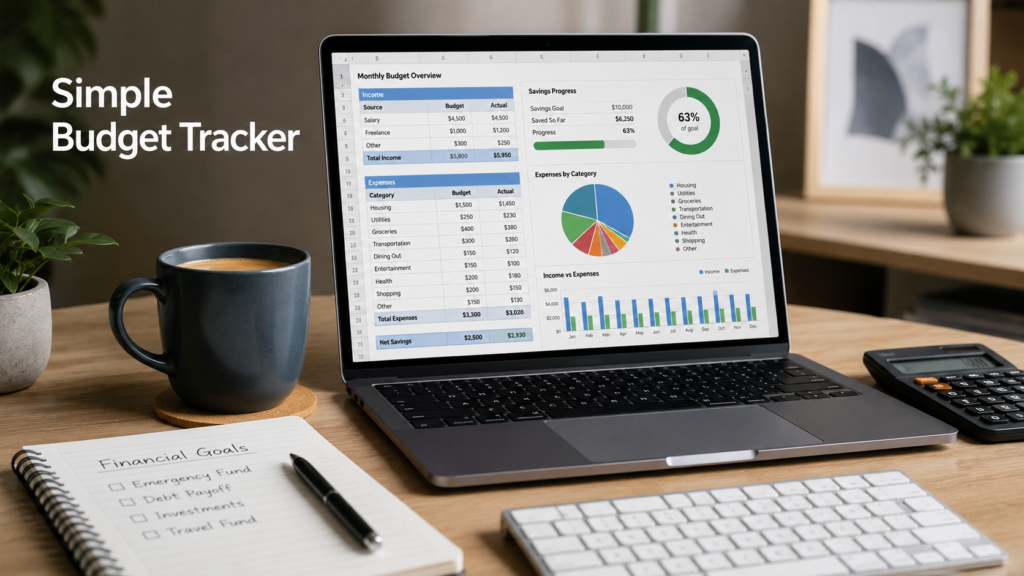

Managing money becomes easier when everything is organized clearly in one place. That’s one reason many people still prefer using Excel for budgeting. It gives full control over income, expenses, and savings without requiring complicated financial software.
If you are new to budgeting, a simple Excel budget tracker is a practical way to start understanding spending habits and planning monthly finances more effectively.
Why Budget Tracking Matters
Many expenses happen in small amounts throughout the month, which makes them easy to overlook. Over time, those small purchases can affect savings goals and monthly planning.
A budget tracker helps create visibility by showing:
- Total monthly income
- Recurring bills
- Spending categories
- Savings progress
- Monthly balance
When everything is visible in one spreadsheet, it becomes easier to make informed financial decisions.
Start With Monthly Income
The first section of the spreadsheet should include all sources of monthly income.
Examples include:
- Salary
- Freelance income
- Side projects
- Passive income
- Other regular payments
Adding income first helps create a realistic budget before expenses are entered.
Organize Expenses Into Categories
Separating expenses into categories makes the spreadsheet much easier to understand.
Common Expense Categories
- Housing
- Utilities
- Groceries
- Transportation
- Dining
- Insurance
- Entertainment
- Savings
This structure helps identify where most money is being spent each month.
Example Monthly Budget Table
| Category | Planned | Actual | Difference |
|---|---|---|---|
| Income | $4,500 | $4,500 | $0 |
| Rent | $1,400 | $1,400 | $0 |
| Groceries | $450 | $510 | -$60 |
| Transportation | $180 | $160 | $20 |
| Savings | $600 | $600 | $0 |
Use Conditional Formatting
Conditional Formatting is one of the most useful Excel features for budget tracking.
For example:
- Overspending can appear in red
- Completed goals can appear in green
- Important bills can highlight automatically
This makes the sheet easier to review quickly without checking every number manually.
Add a Simple Spending Chart
Charts help visualize spending habits more clearly.
A basic pie chart or monthly spending graph can quickly show:
- Highest expense categories
- Monthly trends
- Savings progress
Simple visuals often make financial information easier to understand than rows of numbers alone.
Track Savings Separately
Savings should have their own section inside the spreadsheet. Treating savings like a regular monthly category can help build more consistent financial habits.
Examples:
- Emergency fund
- Vacation savings
- Investment goals
- Future purchases
Even small monthly contributions can become meaningful over time.
Update the Spreadsheet Weekly
The best budget tracker is the one that stays updated consistently.
Instead of waiting until the end of the month, spending a few minutes each week updating expenses helps keep the information accurate and organized.
Weekly updates also make it easier to notice spending patterns before they become difficult to manage.
Helpful Tips for Beginners
Keep the Design Simple
Avoid adding too many formulas or complex sections at the beginning.
Focus on Consistency
A basic spreadsheet used regularly is more useful than a complicated tracker that becomes difficult to maintain.
Review Spending Habits
Use the spreadsheet to understand patterns and improve decisions gradually over time.
Why Excel Still Works Well for Budgeting
Although many budgeting apps are available today, Excel continues to be a reliable option because it offers:
- Flexibility
- Customization
- Easy calculations
- Chart support
- Full control over personal data
For beginners, Excel provides a clean and practical way to organize monthly finances without unnecessary complexity.
Final Thoughts
A simple Excel budget tracker can help create better financial awareness and improve everyday money management. Once income, expenses, and savings are visible in one organized spreadsheet, it becomes much easier to understand spending habits and plan future goals confidently.
The key is consistency. Even a simple budget tracker updated regularly can become a valuable long-term financial tool.

Pingback: Excel vs Google Sheets for Everyday Work - Excel AI Tools and SEO Guides
The emphasis on keeping the design simple is crucial for beginners, as it prevents the budgeting process from becoming overwhelming itself. I particularly appreciated how breaking expenses into visible categories helps catch those small, overlooked purchases that really add up over time. This approach of using Excel for total control while avoiding complex software is definitely a smart strategy for building consistent financial habits.
This post makes a strong case for starting simple with Excel. Focusing on consistency rather than complex formulas seems like the best way for beginners to actually stick to a budget.