
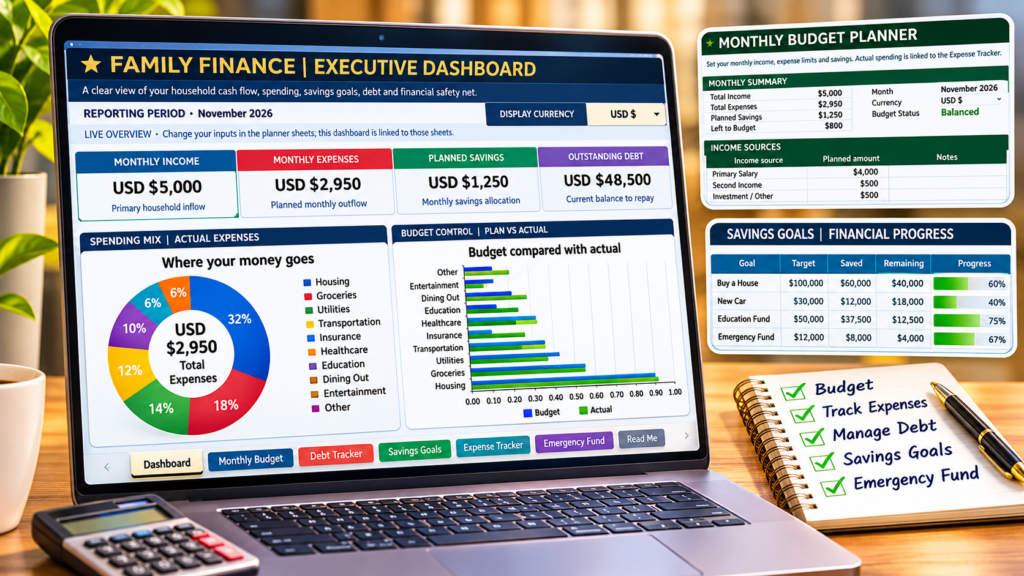

Finance Planner in Excel:- Managing family finances is not just about earning money and paying bills. It is about knowing where your money goes, how much you save every month, how much debt you still have, and whether you are making progress towards your family’s financial goals.
For many households, this information is scattered across bank statements, spreadsheets, notebooks and mobile apps. Monthly expenses are tracked separately, savings goals are forgotten, and debt payments are sometimes difficult to monitor.
A well-organised family finance planner can make this process much easier.
The Premium Family Finance Planner in Excel brings household budgeting, daily expense tracking, debt management, savings goals and emergency fund planning together in one workbook. Instead of maintaining multiple spreadsheets, you can use a single file to understand and monitor your family’s financial position.
In this guide, we will explore how the planner works, what each worksheet does, and how you can use it to build a more organised approach to managing your household finances.
What Is a Family Finance Planner?
A family finance planner is a tool that helps households organise their income, expenses, savings, debts and financial goals.
Think of it as a central financial record for your household.
Rather than looking at your bank balance alone, you can understand several important aspects of your finances:
- How much money your household earns every month.
- How much you spend on regular expenses.
- How much you allocate towards savings.
- How much debt you still need to repay.
- Whether you are making progress towards your financial goals.
- How prepared you are for unexpected expenses.
An Excel-based planner is particularly useful because you can customise it, enter your own information and review your financial position without depending on a subscription-based budgeting application.
Meet the Premium Family Finance Planner in Excel
The Premium Family Finance Planner is designed to make household financial management more organised and easier to understand.
It includes seven interconnected worksheets:
- Dashboard
- Monthly Budget
- Debt Tracker
- Savings Goals
- Expense Tracker
- Emergency Fund
- Read Me
Each worksheet has a specific purpose, while the dashboard brings important financial information together.
1. Family Finance Dashboard: Get a Complete Financial Overview
The Dashboard is the main control centre of the workbook.
Instead of checking multiple worksheets to understand your finances, you can start with one screen and review your household’s financial position.
It provides a visual summary of important financial information, including:
- Monthly household income.
- Monthly expenses.
- Planned savings.
- Spending distribution.
- Budget performance.
- Financial progress indicators.
The dashboard also includes charts to make it easier to understand your spending patterns and compare planned budgets with actual expenses.
For example, if your household spends more than expected on groceries or transportation, the spending breakdown can help you identify where your budget needs attention.
Why it matters: A clear financial overview helps you make better-informed household budgeting decisions instead of relying on assumptions.
2. Monthly Budget Planner: Give Every Rupee a Purpose
A monthly budget is one of the most useful tools for managing household finances.
The Monthly Budget worksheet allows you to enter your income sources, plan your expenses and allocate money towards savings.
You can organise your income into categories such as:
- Primary salary.
- Second income.
- Business or freelance income.
- Investment income.
- Other income.
You can also create monthly expense limits for different spending categories and define how much you want to save.
The worksheet automatically calculates:
- Total monthly income.
- Total planned expenses.
- Planned savings.
- Remaining amount after budget allocations.
- Overall budget status.
For example, consider a household with a monthly income of ₹80,000.
| Category | Monthly Amount |
|---|---|
| Household expenses | ₹30,000 |
| Transportation | ₹8,000 |
| Utilities | ₹5,000 |
| Other expenses | ₹12,000 |
| Planned savings | ₹15,000 |
| Remaining amount | ₹10,000 |
These are illustrative figures, not financial recommendations.
The purpose of budgeting is to make your spending intentional and ensure that savings are not simply whatever remains at the end of the month.
3. Daily Expense Tracker: Understand Where Your Money Goes
Knowing your monthly expenses is important, but understanding individual transactions is even more useful.
The Expense Tracker helps you record everyday spending in one place.
You can enter:
- Transaction date.
- Expense category.
- Description or merchant.
- Amount.
- Payment method.
- Transaction type.
- Additional notes.
The workbook provides space for up to 500 transaction rows.
You can use categories such as groceries, dining out, transportation, utilities and entertainment.
For example:
| Date | Category | Description | Amount |
|---|---|---|---|
| 03 Nov | Groceries | Supermarket | ₹1,200 |
| 03 Nov | Dining Out | Restaurant | ₹450 |
| 04 Nov | Transportation | Fuel | ₹1,500 |
| 05 Nov | Utilities | Electricity bill | ₹2,200 |
Once you record transactions, the workbook uses formulas to summarise expense information and connect it with the monthly budget and dashboard.
This makes it easier to identify spending patterns and understand where your money is going.
A practical tip: Record expenses regularly rather than waiting until the end of the month. Small daily purchases can add up to a significant amount over time.
4. Debt Tracker: Keep Your Repayments Under Control
Debt management is another important part of family financial planning.
Whether you have a personal loan, car loan, credit card balance or education loan, tracking outstanding balances can help you understand your repayment position.
The Debt Tracker allows you to record:
- Debt or loan name.
- Original balance.
- Current outstanding balance.
- Interest rate.
- Minimum monthly payment.
- Amount paid down.
- Due date.
- Additional notes.
It also calculates the outstanding debt position and repayment progress.
For example, you could maintain separate records for a credit card, personal loan, car loan and student loan.
Having this information in one place makes it easier to review your obligations and prioritise repayments.
Why it matters: When you can see your outstanding balances and interest rates together, you have a clearer picture of your debt commitments.
5. Savings Goals Tracker: Turn Financial Plans into Measurable Goals
Saving money becomes easier to manage when you have a clear target.
Instead of simply saying that you want to save more, define what you are saving for and how much you need.
The Savings Goals worksheet helps you track multiple financial goals, including:
- Buying a house.
- Children’s education.
- Family holidays.
- Purchasing a vehicle.
- Building a long-term savings fund.
- Other personal financial milestones.
For every goal, you can enter:
- Goal name.
- Target amount.
- Amount saved so far.
- Target date.
- Monthly contribution.
- Remaining amount.
The worksheet calculates the remaining amount and displays your progress towards each target.
For example, if your goal is to save ₹5,00,000 for a house deposit and you have already saved ₹1,50,000, you can immediately see how much remains.
This makes long-term financial goals easier to monitor.
6. Emergency Fund Builder: Prepare for Unexpected Expenses
An unexpected medical bill, job interruption, home repair or urgent family expense can put pressure on household finances.
This is why an emergency fund deserves a separate place in your financial plan.
The Emergency Fund worksheet helps you estimate how much money you may need for an emergency reserve.
You can enter:
- Essential monthly expenses.
- Desired months of coverage.
- Recommended emergency fund goal.
- Your actual emergency savings.
- Remaining amount required.
- Monthly contribution plan.
The planner supports a coverage range of three to six months of essential expenses.
For example, if your essential monthly expenses are ₹40,000 and you choose six months of coverage, your estimated emergency fund target would be ₹2,40,000.
The workbook calculates your target and helps you monitor your progress.
Remember that the appropriate emergency reserve depends on your household responsibilities, income stability, insurance coverage and other circumstances.
7. Global Currency Selector: Use the Planner in Different Currencies
One useful feature of this workbook is its global currency selector.
You can select your preferred currency directly from the Dashboard.
The available options include:
- Indian Rupee (INR).
- US Dollar (USD).
- Euro (EUR).
- British Pound (GBP).
Once you change the selection, the currency display updates across the planner worksheets.
This makes the workbook more convenient for households that prefer to maintain their financial records in different currencies.
Important: The selector changes the currency symbol and display format. It does not convert existing financial amounts using live exchange rates. If you switch from INR to USD, the underlying numeric values remain unchanged.
How to Start Using the Family Finance Planner
You do not need advanced Excel knowledge to start using the workbook.
Follow these simple steps.
Step 1: Open the Dashboard
Start by exploring the dashboard and understanding the available financial summaries.
Choose your preferred currency.
Step 2: Enter Your Monthly Income
Open the Monthly Budget worksheet and replace the sample income figures with your actual household income.
Step 3: Set Your Monthly Budget
Enter your planned expenses and savings allocations.
Make sure your budget reflects your actual household requirements.
Step 4: Record Daily Expenses
Use the Expense Tracker to record your transactions.
Select the relevant category and payment method, and enter the amount.
Step 5: Update Your Debt Information
If you have outstanding loans or credit card balances, enter the latest figures in the Debt Tracker.
Step 6: Define Your Savings Goals
Add your financial goals, target amounts and monthly contributions.
Update your saved amounts as you make progress.
Step 7: Build Your Emergency Fund
Enter your essential monthly expenses and select your desired coverage period.
Update your emergency savings regularly.
Step 8: Review Your Dashboard
Return to the Dashboard to review your financial position.
As you update the planner worksheets, the linked summaries and charts provide a consolidated view of your finances.
The workbook includes sample entries to demonstrate how the features work. Replace them with your own information before using it for actual financial tracking.
Why Use Excel Instead of Multiple Budgeting Apps?
There are many budgeting applications available, but an Excel-based family finance planner offers some practical advantages.
| Feature | Excel Finance Planner |
|---|---|
| Customisation | Flexible |
| Expense tracking | Included |
| Monthly budgeting | Included |
| Debt management | Included |
| Savings goals | Included |
| Emergency fund planning | Included |
| Visual dashboard | Included |
| Currency display options | Four currencies |
| Data ownership | Workbook stored by you |
One of the biggest advantages is that you can keep your financial information in a workbook that you control.
You can also customise categories, update your financial goals and review historical records without learning a completely new application.
However, this workbook does not automatically connect to your bank accounts or import transactions from financial institutions. You need to enter and update your information manually.
Who Should Use This Family Finance Planner?
This workbook can be useful for:
Working professionals: Monitor monthly income, expenses and savings.
Married couples: Organise shared household expenses and financial goals.
Families with children: Plan for education, holidays and other future expenses.
People managing loans: Keep outstanding balances and repayment progress organised.
First-time budget planners: Start building a consistent monthly budgeting habit.
Excel users: Manage personal finances using familiar spreadsheet features.
It is particularly useful for anyone who wants a consolidated view of household finances without maintaining several separate spreadsheets.
Frequently Asked Questions
1. Is this Family Finance Planner suitable for beginners?
Yes. The workbook includes a Read Me worksheet explaining how to use the different sections. Basic Excel knowledge, such as entering values and selecting dropdown options, is sufficient to get started.
2. Does the dashboard update automatically?
The dashboard uses linked Excel formulas and charts to display information from the planner worksheets. When you update your inputs, the summaries recalculate in Excel.
Make sure Excel calculation is set to Automatic.
3. Can I use this workbook in INR and USD?
Yes. You can select INR, USD, EUR or GBP from the Dashboard currency selector. The selected display currency is reflected across the planner worksheets.
However, the selector does not perform exchange-rate conversion.
4. Can I track multiple financial goals?
Yes. The Savings Goals worksheet provides space for up to 20 goals, including their target amounts, saved amounts, target dates and monthly contributions.
5. Can I track multiple loans?
Yes. The Debt Tracker provides space for multiple debt records, including original balances, outstanding balances, interest rates and minimum payments.
6. Does this workbook connect to my bank account?
No. It is a manual Excel-based financial planner. You enter your income, expenses, savings and debt information yourself.
7. Which Excel version should I use?
A recent desktop version of Microsoft Excel is recommended for the best experience with the workbook’s formulas, dropdowns, charts and formatting.
8. Is this workbook a replacement for professional financial advice?
No. It is a financial organisation and tracking tool. It does not provide personalised investment, tax, insurance or debt advice.
Final Thoughts: Make Family Financial Planning a Regular Habit
Managing family finances does not have to be complicated.
You do not need dozens of spreadsheets or complicated financial software to understand your household’s financial position. What matters is having a consistent system to track income, monitor expenses, manage debt and work towards meaningful financial goals.
The Premium Family Finance Planner brings these essential activities together in one Excel workbook.
Start by recording your monthly income and expenses. Set realistic savings goals, monitor your debt and build an emergency reserve. Then review your dashboard regularly to understand how your financial habits are changing.
Small, consistent improvements in how you manage money can make a meaningful difference over time.
Ready to organise your household finances?
Download the Premium Family Finance Planner Excel workbook and start building a more organised approach to managing your family’s money.
[Download the Premium Family Finance Planner – Excel Workbook] 👇👇
Disclaimer: This workbook is intended for personal financial organisation and educational purposes. It is not a substitute for professional financial, investment, tax or legal advice.

