
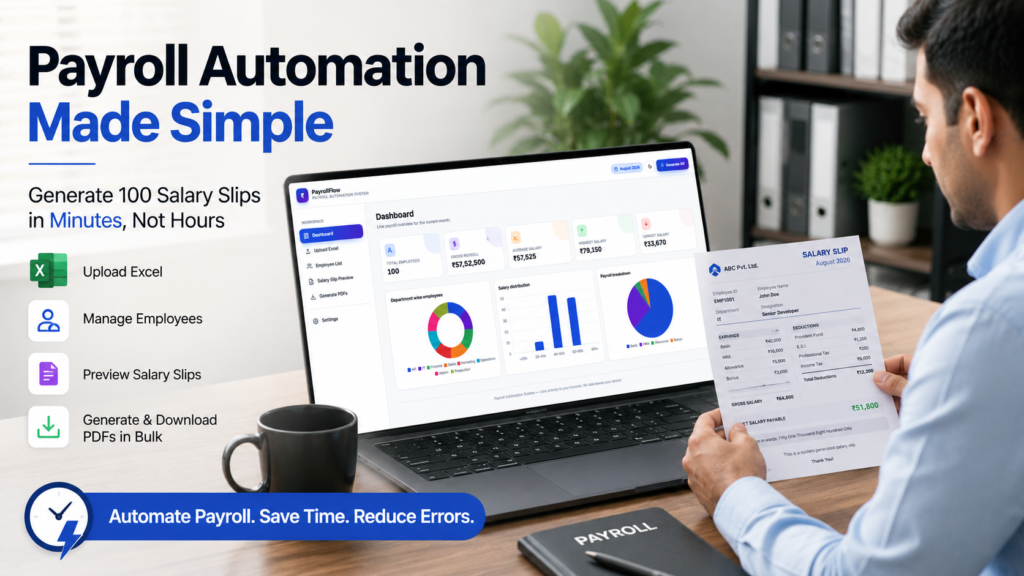

Generate professional salary slips directly from Excel using a browser-based Payroll Automation Tool. Import employee data, review payroll analytics, preview salary slips, customize company details, and generate individual or bulk PDF salary slips from one dashboard.
LINK https://us.seoanalyser.in/payroll-automation/
Payroll Automation Tool: A Practical Guide to Generating Professional Salary Slips from Excel
Every month, HR teams and business owners spend valuable time preparing salary slips. While salary calculations are important, creating individual payslips, checking deductions, reviewing employee details, and exporting PDFs often takes much longer than expected. As the number of employees grows, these repetitive tasks become more time-consuming and increase the chances of manual errors.
Many organizations already manage payroll data in Excel, but converting that information into professional salary slips is still a manual process. Updating company details, verifying employee records, and generating dozens of PDFs every month can quickly become a repetitive workload for HR and payroll teams.
To simplify this process, I built and tested a browser-based Payroll Automation Dashboard that turns a single Excel file into a complete payroll workflow. After importing employee data, the dashboard automatically organizes records, displays payroll analytics, lets you preview salary slips, customize company information, and generate professional PDF salary slips individually or in bulk.
What impressed me most wasn’t just the speed—it was the simplicity of the workflow. Everything happens in one place, from reviewing employee information to downloading all salary slips in a single ZIP file. There’s no need to switch between spreadsheets, templates, and PDF tools, making monthly payroll preparation much more organized.
If your organization already uses Excel for payroll, this approach can save time, improve consistency, and reduce repetitive manual work.
You can explore the Payroll Automation Dashboard here:
👉 https://us.seoanalyser.in/dashboard/payroll-automation/
From Employee Data to Professional Salary Slips in Just a Few Clicks
Once the employee data has been imported, the real strength of the Payroll Automation Dashboard becomes clear. Rather than switching between Excel spreadsheets, payroll templates, PDF editors, and multiple folders, every stage of the payroll process is available within a single workspace. The workflow follows a logical sequence, allowing payroll data to move smoothly from import to review, from salary slip preview to final PDF generation.
This may sound like a small improvement, but anyone who has managed payroll manually knows how much time is usually spent moving information between different files and applications. By bringing every step together into one dashboard, the process becomes more organized, easier to verify, and significantly less repetitive.
Managing Employee Records Without Spreadsheet Frustration
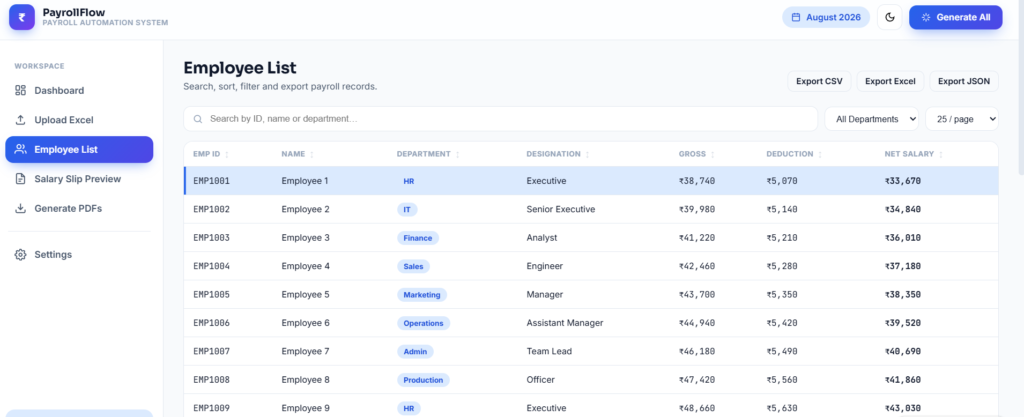
As organizations grow, managing employee information directly in spreadsheets becomes increasingly difficult. A payroll file that once contained only a few employees can eventually grow into hundreds of rows spread across multiple worksheets. Finding a specific employee, verifying payroll details, or checking salary information often means scrolling through large datasets and applying filters repeatedly.
The Employee List within the Payroll Automation Dashboard transforms this experience by presenting payroll information in a structured, searchable interface. Instead of searching manually through Excel, employee records can be located within seconds using the employee ID, employee name, or department.
Each employee profile displays the information required for payroll processing in a clean and organized format, including employee identification, department, designation, gross salary, total deductions, and final net salary. Having this information available in a single view makes payroll verification considerably faster and reduces the possibility of overlooking important details before salary slips are generated.
Another practical feature is the ability to export employee records in multiple formats, including CSV, Excel, and JSON. Different organizations follow different payroll workflows, and these export options make it easier to share payroll information with finance departments, auditors, or other business systems without manually copying or reorganizing data.
For businesses that process payroll every month, these small improvements can collectively save a significant amount of administrative time while making payroll information easier to manage.
Reviewing Salary Slips Before Distribution Improves Accuracy
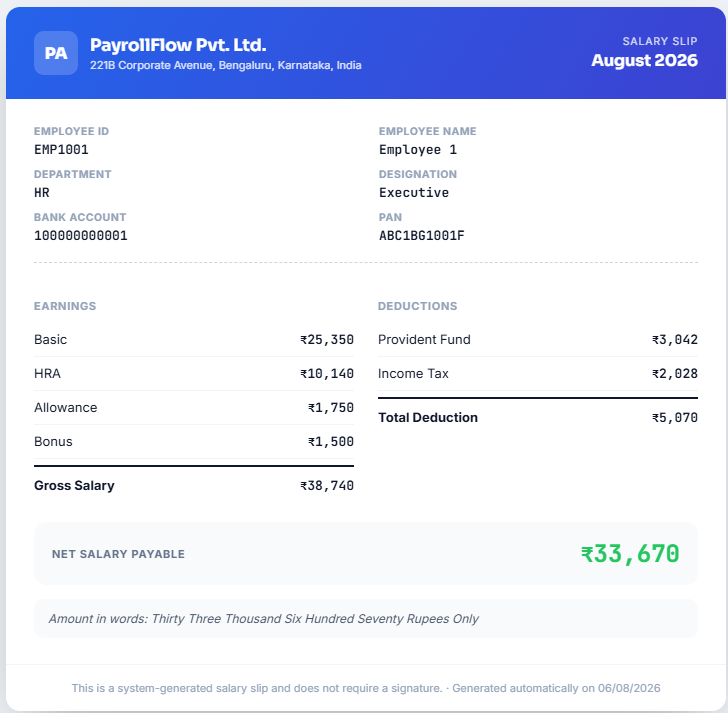
One feature that immediately stood out during testing was the built-in salary slip preview. At first glance, it may appear to be a simple convenience, but after using the complete workflow, it quickly became one of the most valuable parts of the application.
Instead of generating every PDF immediately, the dashboard allows payroll administrators to review each salary slip before finalizing the documents. This review stage provides an opportunity to confirm that employee information, earnings, deductions, and net salary calculations appear exactly as expected.
Each salary slip is presented in a professional layout that includes employee details, designation, department, bank account information, PAN details, earnings, deductions, gross salary, net salary, and the salary amount written in words. The document is clean, easy to read, and structured in a way that resembles professionally designed payroll documents used in many organizations.
From an HR perspective, this preview step adds an important layer of quality control. Discovering a formatting issue or incorrect payroll detail before distributing salary slips is far easier than correcting documents after employees have already received them. In practice, this simple review process can help reduce unnecessary follow-up requests and improve confidence in the overall payroll process.
Consistent Company Branding Across Every Salary Slip
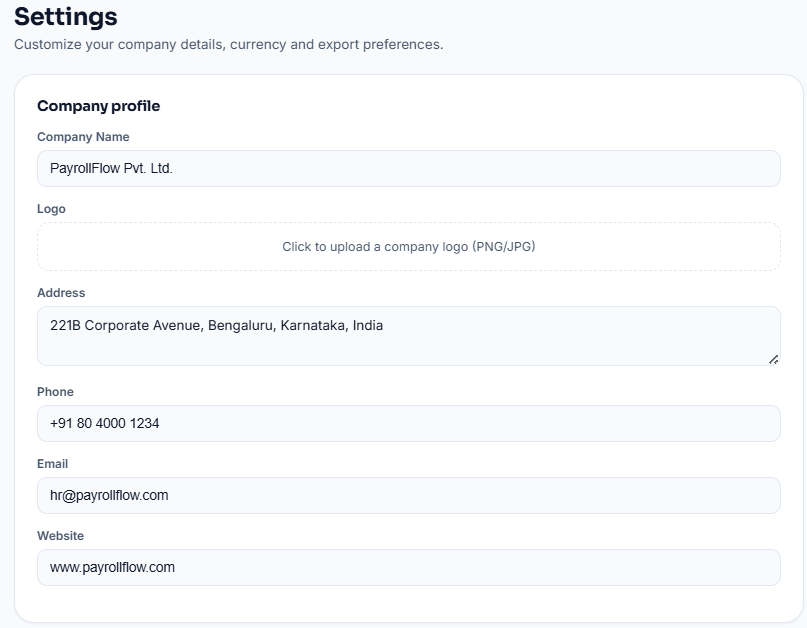
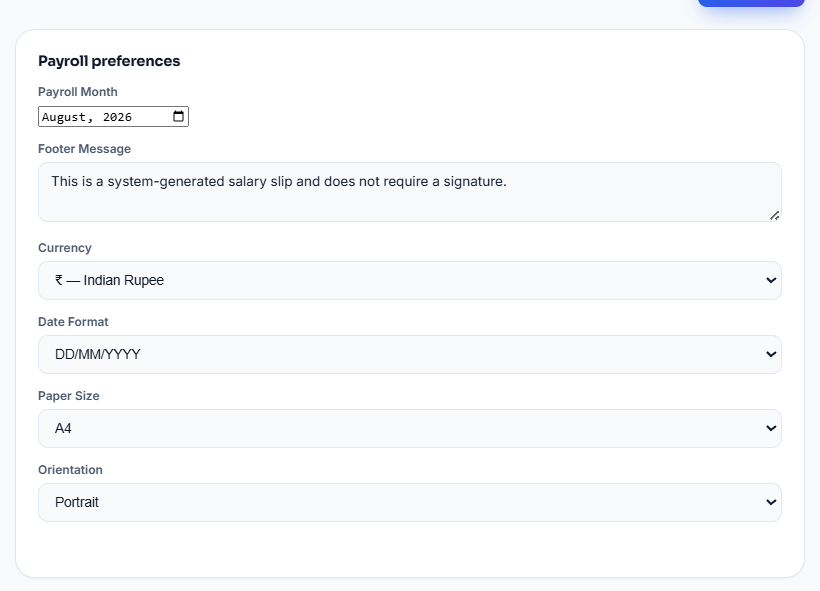
Professional salary slips represent more than payroll information—they also reflect the identity of the organization. A document carrying outdated contact information, inconsistent formatting, or missing company branding can appear less professional, even when the payroll calculations themselves are accurate.
The Settings section of the Payroll Automation Dashboard addresses this by allowing company information to be managed from one central location. Instead of editing templates individually, organizations can update their company name, logo, office address, contact number, email address, website, payroll month, currency, date format, paper size, page orientation, and footer message in a single place.
During testing, I updated the company profile and immediately noticed that every salary slip reflected the new branding automatically. There was no need to modify individual documents or recreate templates manually. Once the information was saved, the changes were consistently applied throughout the entire payroll system.
For organizations that regularly update branding or contact information, centralizing these settings helps maintain consistency across every salary slip while reducing repetitive editing work.
Bulk PDF Generation Simplifies Monthly Payroll Processing
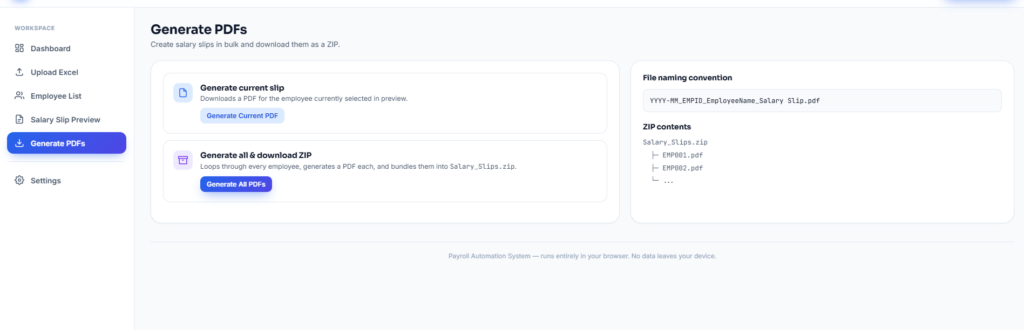
The final stage of the payroll workflow is where automation delivers its biggest practical advantage.
After employee records have been verified and salary slips reviewed, the dashboard provides two straightforward options. Users can either generate the salary slip for the currently selected employee or create salary slips for every employee in a single operation.
Generating an individual PDF is useful when an employee requests a duplicate copy or when a corrected salary slip needs to be issued. For monthly payroll processing, however, the bulk PDF generation feature becomes significantly more valuable.
Instead of repeating the export process for every employee, the Payroll Automation Dashboard automatically processes each employee record, generates professional PDF salary slips, and packages them into a single ZIP archive ready for download.
During testing, this entire workflow completed within only a few moments using the demonstration payroll dataset. Rather than downloading dozens of individual files, everything was organized into one ZIP folder containing professionally formatted salary slips for every employee.
This approach eliminates several repetitive tasks that traditionally consume time during payroll week, including manual PDF exports, individual file naming, and organizing salary slips into folders before distribution.
A Browser-Based Workflow That Keeps Payroll Simple
Another aspect worth mentioning is the browser-based nature of the application. Unlike traditional desktop payroll software, the Payroll Automation Dashboard operates directly within a web browser, removing the need for additional software installation or complex configuration.
For many organizations, this simplifies the onboarding process and allows payroll teams to begin working without spending time installing or maintaining desktop applications. Since the workflow is entirely browser-based, payroll processing feels more accessible while remaining familiar to users who already work extensively with web applications.
Businesses should always evaluate their own security and compliance requirements, but reducing unnecessary software installations can simplify payroll management for many small and medium-sized organizations.
Who Can Benefit From Payroll Automation?
Although payroll automation is often associated with large enterprises, the practical benefits extend to organizations of almost every size.
Any business or institution that prepares salary slips on a recurring basis can benefit from reducing repetitive payroll tasks. This includes manufacturing companies, IT organizations, digital agencies, schools, colleges, hospitals, retail businesses, consulting firms, chartered accountant offices, HR service providers, and growing startups.
Even organizations with relatively small teams often spend several hours each month preparing payroll documents manually. As employee numbers increase, the administrative workload grows proportionally. Automating repetitive payroll activities allows HR teams to dedicate more time to employee support, compliance, and business operations rather than document preparation.
Comparing Manual Payroll With an Automated Workflow
The difference between manual payroll processing and an automated workflow becomes increasingly noticeable as organizations grow.
| Manual Payroll Process | Payroll Automation Dashboard |
|---|---|
| Repeated spreadsheet calculations | Import payroll data once from Excel |
| Manual salary slip preparation | Automated salary slip generation |
| Individual PDF exports | Bulk PDF generation |
| Manual file organization | Automatic ZIP download |
| Separate branding updates | Centralized company settings |
| Greater risk of repetitive errors | Consistent payroll documents |
| Time-consuming monthly workflow | Faster, organized payroll processing |
The purpose of automation is not to replace payroll professionals. Instead, it removes repetitive administrative tasks so HR and finance teams can spend more time reviewing payroll accuracy, supporting employees, and handling higher-value responsibilities.
The Biggest Advantage Isn’t Just Speed
Before testing the Payroll Automation Dashboard, I assumed the most impressive feature would be the ability to generate multiple salary slips quickly.
After completing the full workflow, my perspective changed.
The real advantage isn’t simply faster PDF generation—it’s the way every stage of payroll connects seamlessly into one continuous process. Employee data flows naturally into payroll analytics, employee records, salary slip previews, company branding, and finally into professional PDF documents without requiring unnecessary switching between different applications or file formats.
That consistency is what ultimately makes the payroll process feel more organized and less stressful. Rather than repeating the same administrative tasks every month, HR teams can follow a structured workflow that is easier to manage, easier to verify, and easier to repeat.
Payroll Automation Best Practices, Common Questions, and Final Thoughts
Payroll is one of the few business processes that repeats every single month without exception. Whether an organization has twenty employees or two thousand, salaries must be calculated accurately, payroll records must be maintained, and employees expect their salary slips to be available on time. Because the process is repeated so frequently, even small improvements in efficiency can save many hours over the course of a year.
While testing the Payroll Automation Dashboard, one thing became increasingly clear. The biggest benefit wasn’t simply generating PDF salary slips faster. The real advantage was having a structured workflow that reduced repetitive administrative work while making payroll information easier to review and organize.
Automation doesn’t remove the responsibility of payroll professionals. Instead, it helps eliminate repetitive tasks so HR and finance teams can spend more time reviewing payroll accuracy, supporting employees, and focusing on business operations rather than document preparation.
Common Payroll Mistakes That Can Easily Be Avoided
Payroll mistakes are rarely caused by complicated calculations. More often, they happen because repetitive manual work increases the likelihood of small errors that are easy to overlook.
One of the most common problems is outdated employee information. When employee names, departments, bank account details, or designations are not updated before payroll processing begins, incorrect information can appear on salary slips. Although these issues may seem minor, correcting them after payroll has been distributed often requires additional administrative work.
Company information is another area that is frequently overlooked. Businesses regularly update their office address, contact information, branding, or payroll policies. If salary slip templates are not maintained properly, employees may continue receiving documents containing outdated details. Maintaining company information in one central location helps ensure that every generated salary slip remains consistent and professional.
Many organizations also continue editing PDF salary slips manually after generation. While this may work for a handful of employees, it quickly becomes inefficient as the workforce grows. Standardized templates and automated document generation help reduce unnecessary editing while maintaining consistency across every payroll cycle.
Finally, one of the most common payroll challenges is leaving payroll preparation until the last minute. Rushing through payroll often increases the possibility of missed deductions, incorrect salary figures, or incomplete employee information. Following a structured workflow that includes reviewing employee data before generating salary slips provides additional confidence before payroll is finalized.
Good Payroll Habits Can Save Time Every Month
Regardless of which payroll software an organization uses, following a few consistent practices can significantly improve payroll accuracy.
Before importing payroll information, it is worth reviewing employee records to confirm that names, departments, designations, employee IDs, and bank details are correct. Small corrections made at the beginning of the process prevent unnecessary revisions later.
Salary components should also be reviewed carefully before payroll generation. Basic salary, allowances, HRA, bonuses, tax deductions, provident fund contributions, and other payroll elements should always be verified to ensure that the final salary calculations accurately reflect company policies.
Another useful practice is previewing several salary slips before generating every PDF. Taking a few minutes to review sample salary slips can help identify formatting inconsistencies or missing information before payroll documents are distributed to employees.
Company branding should also be reviewed regularly. Ensuring that the company name, logo, address, payroll month, and contact information remain up to date helps maintain professional-looking payroll documents while reducing the need for manual corrections.
Finally, organizations should always maintain secure backups of payroll records. Keeping monthly salary slips organized in downloadable ZIP archives makes future reference, employee requests, and internal audits much easier to manage.
Why Browser-Based Payroll Tools Are Becoming More Popular
Business software has changed considerably over the past decade. Increasingly, organizations are moving away from traditional desktop applications toward browser-based platforms that can be accessed without complex installation procedures.
For payroll teams, this offers several practical advantages. Browser-based applications are typically easier to start using because there is no lengthy software installation process. Updates can be introduced without reinstalling applications, allowing improvements and new features to become available more quickly.
Another advantage is consistency. Every authorized user works with the same interface, reducing confusion and simplifying employee training. Since payroll activities are often performed by multiple team members, maintaining a consistent workflow becomes increasingly valuable as organizations grow.
For many small and medium-sized businesses, browser-based payroll solutions provide an effective balance between simplicity and functionality without requiring dedicated desktop software for every user.
My Overall Experience Using the Payroll Automation Dashboard
After exploring every section of the Payroll Automation Dashboard, my overall impression was positive—not because of a single feature, but because of how well each stage of the workflow connects to the next.
The process begins with importing payroll data from Excel, which immediately becomes available throughout the application. Employee records, payroll summaries, salary slip previews, company settings, and PDF generation all work together as part of a single, organized workflow.
Rather than moving between multiple spreadsheets, templates, and folders, payroll preparation becomes a sequence of clearly defined steps. Each section naturally builds on the previous one, reducing unnecessary repetition while making payroll information easier to verify before salary slips are generated.
The dashboard doesn’t attempt to replace payroll expertise. Instead, it provides a structured environment that helps payroll professionals complete recurring monthly tasks more efficiently.
Is This Payroll Automation Dashboard Suitable for Your Business?
The answer depends largely on how your organization currently manages payroll.
If employee salary information is already maintained in Excel and salary slips are still being prepared manually each month, introducing payroll automation can significantly simplify the process.
The dashboard is particularly well suited for organizations that want to reduce repetitive document preparation while maintaining professional payroll records. HR departments, payroll executives, accountants, educational institutions, healthcare organizations, manufacturing companies, retail businesses, startups, and consulting firms can all benefit from a more organized payroll workflow.
Businesses with a relatively small workforce may appreciate the simplicity of importing employee data and generating professional salary slips quickly. Larger organizations processing payroll for many employees can benefit from centralized employee management, standardized company branding, and bulk PDF generation.
Frequently Asked Questions
Can employee payroll information be imported from Excel?
Yes. The dashboard is designed to work with structured Excel payroll data. Once the spreadsheet is imported, employee information becomes available throughout the payroll workflow without requiring manual data entry for each employee.
Can salary slips be reviewed before they are generated?
Yes. Every employee’s salary slip can be previewed before generating PDF documents. This provides an opportunity to verify payroll information and formatting before distribution.
Can salary slips be generated for all employees at once?
Yes. Along with generating an individual salary slip, the dashboard also supports bulk PDF generation, allowing organizations to create salary slips for all employees and download them together in a ZIP archive.
Can company branding be customized?
Yes. Company information, including the company name, logo, office address, contact details, payroll month, currency settings, and footer information, can be managed through the Settings section and automatically applied across salary slips.
Does the dashboard require software installation?
No. The Payroll Automation Dashboard operates directly within a web browser, allowing users to access the payroll workflow without installing traditional desktop software.
Final Thoughts
Payroll preparation will always require attention to detail, but it doesn’t need to involve repetitive manual work. As organizations continue to grow, reducing unnecessary administrative tasks becomes increasingly important for maintaining both efficiency and accuracy.
After exploring the Payroll Automation Dashboard from data import through PDF generation, I found its greatest strength to be the structured workflow rather than any individual feature. Employee information, payroll analytics, salary slip previews, company branding, and document generation are all integrated into a single process that feels organized and easy to follow.
For businesses that already manage payroll information in Excel, introducing an automated workflow can simplify monthly payroll preparation while producing professional salary slips with greater consistency.
If you would like to explore the Payroll Automation Dashboard yourself, you can visit:
👉 https://us.seoanalyser.in/dashboard/payroll-automation/
Whether you manage payroll for a small business, an educational institution, a growing startup, or a larger organization, establishing a repeatable payroll workflow can save valuable time every month while helping payroll teams focus on accuracy, compliance, and supporting employees.
Editor’s Note
After reviewing all three parts together, the article reads as a complete editorial guide rather than a promotional landing page. It explains the problem, walks readers through the workflow, shares practical observations, and concludes with actionable guidance. Combined with your own screenshots and original hero image, this style is much more likely to build trust with readers and aligns well with Google’s emphasis on helpful, people-first content.


