


Generate Certificates from Excel Creating hundreds of professional certificates manually is one of the most time-consuming tasks for trainers, schools, universities, HR teams, and event organizers. Fortunately, you don’t need to edit each certificate individually anymore.
With the SEOAnalyser Certificate Generator, you can design your certificate once, upload your Excel file, and automatically generate personalized certificates for every participant in just a few clicks.
👉 Try it here: https://us.seoanalyser.in/dashboard/certificate-generator/
Why Generate Certificates from Excel?
Imagine you have 500 participants attending your workshop.
Creating each certificate manually would require:
- Editing each participant’s name
- Updating certificate numbers
- Adding course information
- Inserting QR codes
- Exporting each certificate individually
That process could take several hours—or even days.
Our Certificate Generator automates the entire workflow and completes everything in minutes.
What Makes This Certificate Generator Different?
Unlike traditional certificate editors, this tool is built specifically for bulk certificate generation.
Key Features
✅ Import participant details directly from Excel
✅ Design certificates using your own template
✅ Upload custom background images
✅ Automatically insert participant names
✅ Add certificate numbers
✅ Generate QR codes
✅ Export all certificates as PDF
✅ Download all certificates in a ZIP file
✅ Dashboard with participant statistics
✅ Multiple themes
✅ Fast cloud processing
How to Generate Certificates from Excel
Generating certificates takes only a few simple steps.
Step 1: Open the Certificate Generator
Visit:
https://us.seoanalyser.in/dashboard/certificate-generator
You’ll see an easy-to-use dashboard designed for beginners and professionals alike.
Step 2: Design Your Certificate
Click on Certificate Designer.
Here you can customize your certificate by uploading your own professional background.
You can also configure:
- Recipient Name
- Course Name
- Completion Date
- Training Hours
- Grade
- Certificate Number
- QR Code
- Instructor Signature
- Organization Name
Everything is fully customizable.
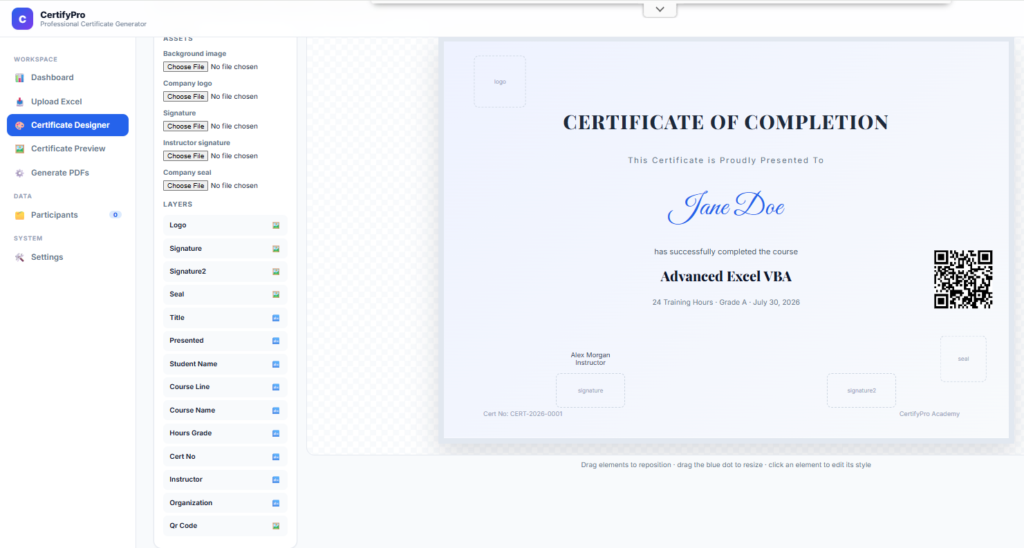
Step 3: Upload Your Background Image
A professional background creates a premium-looking certificate.
Simply click:
Choose File
Select your certificate background.
Your design instantly becomes the base template for every certificate generated.
Step 4: Configure Dynamic Fields
Now map the fields that will be replaced automatically using your Excel data.
Typical fields include:
- Student Name
- Course
- Date
- Certificate Number
- Grade
- QR Code
- Training Hours
Once configured, every certificate is generated automatically.
Step 5: Upload Your Excel File
Next, click:
Upload Excel
Choose your Excel spreadsheet.
Within seconds, the system imports all participant information.
Example:
10 Participants Imported SuccessfullyYou don’t need to enter names manually.
Step 6: Preview Every Certificate
Before generating PDFs, preview your certificates.
The preview allows you to verify:
- Participant Name
- Certificate Number
- Course Title
- QR Code
- Date
- Overall Design
You can even preview certificates individually before exporting.
Step 7: Generate PDF Certificates
When everything looks perfect, click:
Generate All Certificates
The system automatically creates professional PDF certificates for every participant.
Generation usually takes only 10–15 seconds, depending on the number of certificates.
Step 8: Download ZIP File
Once generation is complete, the system prepares a ZIP file containing every PDF certificate.
Simply download and share them with your participants.
No manual editing.
No repetitive work.
Built-In Dashboard
The tool also provides a powerful analytics dashboard.
You can instantly view:
- Total Participants
- Number of Courses
- Generated Certificates
- Recent Activity
- Theme Settings
Everything is available from one place.
Who Can Use This Tool?
This online certificate generator is perfect for:
- Online Course Creators
- Schools
- Colleges
- Universities
- Coaching Institutes
- HR Departments
- Corporate Training Teams
- Webinar Hosts
- Workshop Organizers
- Event Managers
- NGOs
- Certification Programs
Whether you’re generating 20 certificates or 20,000, the workflow remains the same.
Benefits of Using an Excel-Based Certificate Generator
Using Excel as the data source offers several advantages:
- No manual typing
- Eliminates human errors
- Saves hours of work
- Professional output
- Bulk PDF generation
- Easy participant management
- Reusable certificate templates
- Faster certificate delivery
Why QR Codes Matter
Modern certificates often include QR codes for verification.
With this tool, QR codes are generated automatically, making certificates:
- More secure
- Easier to verify
- Professional-looking
- Suitable for corporate and educational use
Supported Dynamic Fields
The generator supports a wide range of fields, including:
- Participant Name
- Course Name
- Certificate Number
- Completion Date
- Grade
- Duration
- Training Hours
- Organization
- Instructor
- QR Code
You can easily create personalized certificates for every participant.
Frequently Asked Questions
Is the tool free?
Yes. You can start using the Certificate Generator online without installing any software.
Can I upload my own certificate design?
Yes.
You can upload your own certificate background and fully customize the layout.
Does it support Excel files?
Absolutely.
Simply upload your Excel file, and the system automatically imports participant details.
Can I generate hundreds of certificates?
Yes.
The tool is designed for bulk certificate generation and can process large participant lists efficiently.
Does it generate PDFs?
Yes.
All certificates are exported as professional PDF files and packaged into a ZIP archive for easy download.
Final Thoughts
If you’re still creating certificates manually, you’re spending far more time than necessary.
The SEOAnalyser Certificate Generator simplifies the entire process—from certificate design to Excel import, PDF generation, ZIP download, and participant management—all in one place.
Whether you’re managing a classroom, corporate training session, webinar, or certification program, this tool helps you generate professional certificates quickly and accurately.
👉 Start generating certificates today:
https://us.seoanalyser.in/dashboard/certificate-generator/


Pingback: The Hidden Excel Camera Tool That Makes Live Dashboards Look Professional (No VBA Required)-2026 - Excel AI Tools and SEO Guides