

Top Pivot Table Interview Questions and Answers (2026 Guide)
Top Pivot Table Interview Questions:-Excel skills have become one of the most demanded requirements in jobs ranging from data entry and finance to business analysis and operations. And if there is one Excel topic that interviewers repeatedly ask candidates about, it is Pivot Tables.
Many candidates confidently mention Excel in their resume but become stuck when an interviewer asks practical questions like:
“What is a Pivot Table?”
“How do you refresh Pivot Table data?”
“What is the difference between Pivot Table and normal table?”
Imagine sitting in an interview room. You answer every question smoothly until suddenly the interviewer opens Excel and asks:
“Can you create a sales summary by region in less than one minute?”
That moment decides whether your Excel knowledge is practical or only theoretical.
This guide covers the most important Pivot Table interview questions and answers from beginner to advanced level in a simple and human-friendly way. These are commonly asked in job interviews for data analyst roles, MIS executive jobs, finance positions, and office-related careers.
What is a Pivot Table?
A Pivot Table is an Excel feature used to summarize, organize, analyze, and present large amounts of data quickly without changing the original dataset.
Using Pivot Tables, users can:
- Calculate totals
- Count values
- Find averages
- Compare categories
- Create reports quickly
- Analyze trends
Basic Pivot Table Interview Questions
1. What is a Pivot Table in Excel?
A Pivot Table is a tool that summarizes large datasets into meaningful reports. It helps users analyze information without manually creating formulas. Sample Answer:
“A Pivot Table is an Excel feature that allows us to summarize and analyze large datasets by arranging information into rows, columns, and calculations.”
2. Why is it called a Pivot Table?
It is called a Pivot Table because users can rotate or rearrange fields dynamically to view data from different perspectives.
3. What are the four areas of a Pivot Table?
The four areas are:
- Filters
- Columns
- Rows
- Values
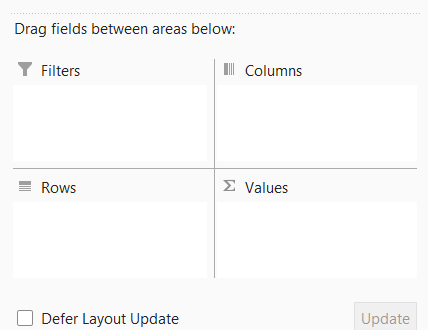
Each area performs a different role while organizing information.
4. How do you create a Pivot Table?
Steps:
- Select data range
- Go to Insert tab
- Click Pivot Table
- Select location
- Drag fields into Rows, Columns, and Values
5. Can Pivot Table update automatically?
By default, Pivot Tables do not refresh automatically. Users need to refresh manually or use VBA for automatic refresh.
Intermediate Pivot Table Interview Questions
6. What is the difference between Table and Pivot Table?
| Table | Pivot Table |
|---|---|
| Stores raw data | Summarizes data |
| Shows complete records | Shows summarized reports |
| No automatic calculations | Provides calculations instantly |
7. How can you refresh a Pivot Table?
Right-click inside the Pivot Table and select:
Refresh
Shortcut:
Alt + F5
8. What is a Pivot Cache?
Pivot Cache is the memory storage used by Excel to keep a copy of source data so Pivot Tables can operate faster.
9. Can multiple Pivot Tables use one source?
Yes. Multiple Pivot Tables can use the same source data.
This reduces duplication and improves efficiency.
10. Can you use data from different worksheets in a Pivot Table?
Yes. Multiple worksheets can be combined using:
- Power Query
- Data Model
- Multiple Consolidation Range
Advanced Pivot Table Interview Questions
11. What is a Calculated Field?
A Calculated Field allows users to create custom formulas inside a Pivot Table.
Example:
Profit = Sales − Cost
12. What is the difference between Calculated Field and Calculated Item?
| Calculated Field | Calculated Item |
|---|---|
| Creates formula using fields | Creates formula using items |
| Works across records | Works within fields |
13. What are Slicers in Pivot Tables?
Slicers are visual filtering tools used to filter Pivot Table data quickly with buttons.
They make reports interactive and easier to understand.
14. What is a Timeline in Pivot Table?
Timeline is a visual date filter that allows users to filter by:
- Years
- Months
- Quarters
- Days
15. Can we create charts from Pivot Tables?
Yes.
Pivot Charts can be created directly from Pivot Tables for data visualization.
Practical Scenario-Based Interview Questions
16. If new rows are added to source data, why aren’t they appearing in Pivot Table?
Possible reasons:
- Pivot Table was not refreshed
- Source range is fixed
- Data wasn’t converted into an Excel Table
Best practice: Convert source data into an Excel Table before creating Pivot Tables.
17. How would you find top 5 sales performers using Pivot Table?
Steps:
- Create Pivot Table
- Place employee names in Rows
- Place sales in Values
- Apply Value Filter
- Select Top 10 → Change to Top 5
18. How do you remove grand totals?
Go to:
Design → Grand Totals → Off
19. Can Pivot Table handle millions of rows?
Traditional Excel has limitations, but using Power Pivot and Data Model can efficiently handle millions of rows.
Quick Rapid-Fire Pivot Table Questions
- Can Pivot Tables use external databases? → Yes
- Can we group dates in Pivot Table? → Yes
- Can we create custom calculations? → Yes
- Can Pivot Tables sort automatically? → Yes
- Can we filter multiple items? → Yes
- Can Pivot Tables remove duplicates? → No directly
Common Mistakes Candidates Make in Interviews
Many candidates know Pivot Tables but lose marks because of avoidable mistakes:
- Memorizing definitions only
- Not practicing with real datasets
- Forgetting refresh option
- Confusing Calculated Field with Calculated Item
- Not knowing Slicers and Timelines
Interview Preparation Tips
If you want to answer Pivot Table questions confidently:
- Practice with sales data
- Create reports daily
- Use Slicers and Charts
- Understand practical scenarios
- Practice shortcut keys
- Try solving business problems
Frequently Asked Questions (FAQs)
Is Pivot Table difficult to learn?
No. Basic Pivot Tables can be learned within a few hours of practice.
Are Pivot Table questions asked in interviews?
Yes. Excel interviews frequently include Pivot Table questions for office, analyst, MIS, and finance roles.
Which industries use Pivot Tables?
Finance, banking, healthcare, logistics, HR, marketing, and business analytics use Pivot Tables extensively.
How much time does it take to master Pivot Tables?
Basic skills may take a few days, while advanced concepts like Power Pivot and Calculated Fields may require several weeks of practice.
Final Thoughts
Pivot Tables are not just an Excel feature; they are a problem-solving tool. Interviewers often ask these questions because they want to know whether candidates can turn raw data into meaningful insights.
Instead of memorizing answers, practice creating reports and analyzing real-world datasets. That practical experience will help you stand out during interviews.
The next time someone asks:
“Are you comfortable with Pivot Tables?”
You will answer with confidence.


Pingback: SUMIF vs SUMIFS in Excel: What’s the Difference? (+ Real Examples) - Excel AI Tools and SEO Guides
Pingback: 25 ChatGPT Prompts Every Excel User Should Save in 2026 - Excel AI Tools and SEO Guides
Pingback: Top 10 Excel 365 Features You Won’t Find in Older Versions - Excel AI Tools and SEO Guides